AI Character Bible: The Ultimate Guide to Creating Consistent AI Characters for Images and Videos
If you’ve ever generated an AI character that looked perfect in one image but completely different in the next, you’re not alone. This is one of the biggest challenges AI creators face today. Whether you’re using ChatGPT, Midjourney, FLUX, or an AI video generator, maintaining the same face, hairstyle, body proportions, and overall identity across multiple images can be surprisingly difficult.
Imagine creating a character for a YouTube series, children’s storybook, comic, advertisement, or short film. The first image looks amazing, but the second image changes the face. The third image changes the hairstyle. By the fourth image, the character looks like a completely different person.
This problem is commonly known as Character Drift.
The good news is that professional AI creators rarely rely on a single reference image anymore. Instead, they build something called a Character Bible—a complete visual identity system that helps AI models understand exactly who the character is.
Instead of giving the AI one photo, you’re giving it an entire identity.
A Character Bible usually includes multiple camera angles, facial expressions, body poses, color palettes, outfit variations, and detailed identity information. Together, these elements create a much stronger reference than a single image ever could.
This approach has become increasingly important as AI image and video generation continues to improve. Modern AI models can interpret detailed visual references far better than older systems, making Character Bibles one of the most effective ways to improve consistency across an entire creative project.
In this guide, you’ll learn:
- What an AI Character Bible actually is
- Why AI characters become inconsistent
- How professional creators maintain character consistency
- How to build your own reusable Character Bible
- Complete Character Bible examples for a human, a Basset Hound, and a futuristic robot
- Expert prompting techniques that improve consistency in both AI images and AI videos
Whether you’re a beginner experimenting with AI art or an experienced prompt engineer creating professional content, this guide will give you a workflow you can reuse for hundreds of future projects.
What Is an AI Character Bible?
Think of a Character Bible as a complete identity document for your AI character.
Instead of telling the AI, “Create a woman with green eyes,” you’re providing a structured visual system that defines every important detail of the character.
A professional Character Bible doesn’t just describe appearance—it captures identity.
It explains how the character looks from different angles, how they express emotions, what colors define them, what clothing styles they wear, how they move, and even how the camera should frame them.
The goal isn’t simply to generate beautiful images.
The goal is to generate the same character again and again, even when the environment, clothing, lighting, or action changes.
This is why modern AI creators consider a Character Bible one of the most valuable assets in any long-term creative project.
Why Do AI Characters Change?
One of the biggest frustrations in AI image generation is creating a beautiful character that suddenly looks completely different in the next image.
You might keep the same prompt, use the same style, and even choose the same AI model, yet the character’s face, hairstyle, body proportions, clothing, or even eye color changes.
This problem is known as Character Drift.
Character Drift happens because AI doesn’t truly “remember” a character the way humans do. Every new image is generated independently unless you provide strong visual and textual guidance.
Think of it this way:
If you ask an artist to draw “a young woman with green eyes” ten times without showing a reference, you’ll probably get ten different women.
AI behaves in a very similar way.
That’s why professional AI creators don’t rely on memory—they rely on reference systems.
A Character Bible is one of the most effective reference systems available today.
What Is Character Drift?
Character Drift is the gradual loss of a character’s identity across multiple images or videos.
It can affect almost every visual element, including:
- Facial anatomy
- Eye shape and eye color
- Hair style or hair color
- Body proportions
- Skin tone
- Clothing details
- Accessories
- Fur patterns (for animals)
- Camera perspective
- Overall visual identity
Sometimes the changes are subtle.
Other times, the AI creates an entirely different character while still following the same prompt.
This becomes a serious problem for:
- Storytelling
- Comics
- Children’s books
- YouTube animations
- AI short films
- Marketing campaigns
- Brand mascots
- Game development
Consistency is what makes an audience recognize a character.
Without consistency, the illusion is broken.
Why a Single Reference Image Isn’t Enough
Many beginners believe that uploading one reference image is enough to keep a character consistent.
Unfortunately, that’s rarely true.
A single image only shows one moment.
It doesn’t tell the AI:
- What the character looks like from the side.
- How they smile.
- How they look when surprised.
- What happens if they wear different clothes.
- How their body proportions should remain consistent.
- How they appear under different lighting conditions.
The AI has to guess the missing information.
Every guess increases the chance of Character Drift.
This is exactly why professional creators build a Character Bible instead of relying on a single image.
Character Bible vs. Single Reference Image
| Single Reference Image | Character Bible |
|---|---|
| Shows one angle | Shows multiple angles |
| One facial expression | Multiple expressions |
| One outfit | Multiple outfit variations |
| Limited visual information | Complete visual identity |
| AI has to guess missing details | AI receives detailed guidance |
| Higher risk of Character Drift | Much stronger consistency |
A Character Bible doesn’t eliminate variation completely, but it significantly reduces it by giving the AI far more information to work with.
How Modern AI Models Use Character Bibles
Modern AI models are much better at interpreting structured visual references than earlier generations.
Instead of treating each image as a brand-new request, they can analyze multiple reference elements such as:
- Face structure
- Body proportions
- Hair style
- Color palette
- Clothing design
- Camera angles
- Expressions
- Pose references
The more complete your Character Bible is, the less the AI has to invent on its own.
That’s why experienced creators often spend more time designing the Character Bible than writing the final image prompt.
A well-designed Character Bible becomes a reusable creative asset that can support hundreds of images and videos while maintaining a recognizable identity.
The Prompt Home Pro Tip
A common misconception is that a Character Bible guarantees identical results every time.
It doesn’t.
Instead, think of it as reducing uncertainty.
The AI still generates new images, but now it has a much stronger understanding of who the character is before it decides what the character is doing.
This small shift in workflow is what separates casual AI users from professional AI creators.
The Complete Anatomy of a Professional Character Bible
A strong Character Bible is much more than a collection of random reference images.
It is a structured visual identity system that tells the AI exactly who the character is before you ask what the character is doing.
Professional AI creators usually build Character Bibles with multiple sections, each serving a specific purpose. The more complete the system is, the less the AI has to guess, and the less Character Drift you will experience.
Think of it as giving the AI a complete character dossier rather than a single photograph.
The 10 Essential Sections Every Character Bible Should Include
Below are the core sections used by many professional AI artists, storyboard creators, and AI video producers.
1. Front View
This is the character’s primary reference image.
It should clearly show:
Face structure
Hair style
Eye color
Body proportions
Clothing style
Accessories
Overall silhouette
The front view becomes the AI’s main visual anchor.
2. Side Views (Left & Right)
A single front image cannot fully explain a character’s shape.
Side views help the AI understand:
Nose profile
Jawline
Hair volume
Ear position
Body depth
Neck structure
These views are especially important for AI video generation because characters are constantly turning their heads and bodies.
3. Back View
Many creators skip this step, but it can dramatically improve consistency.
The back view shows:
Hairstyle from behind
Clothing design
Body shape
Accessories placement
Tail, backpack, armor, or other rear details
This becomes extremely useful when creating walking, running, or turning scenes.
4. Facial Expressions Sheet
A professional Character Bible usually includes multiple emotions.
Common expressions include:
This section teaches the AI how the same face changes with different emotions without becoming a different character.
For storytelling, this is one of the most valuable sections in the entire Bible.
5. Full Body Turnaround
A turnaround sheet typically includes:
Front
3/4 Front
Side
3/4 Back
Back
This helps maintain consistent body proportions in both images and videos.
Without a turnaround sheet, AI models often change height, shoulder width, leg length, or overall body shape between generations.
6. Pose Reference Sheet
Professional creators frequently include 10–20 common poses, such as:
Standing
Walking
Sitting
Running
Arms crossed
Waving
Holding an object
Looking at a phone
Thinking
Pointing
This makes it easier to create storyboards, comics, advertisements, and AI videos while preserving the same character.
7. Outfit Variations
One of the most common causes of Character Drift is changing clothes.
The AI sometimes treats a new outfit as a new character.
A strong Character Bible includes several outfit references, for example:
Casual outfit
Formal suit
Hoodie or jacket
Sportswear
Uniform
Cinematic costume
By showing the same character in multiple outfits, you teach the AI that the identity remains the same even when the clothing changes.
8. Color Palette
This section defines the character’s core colors.
For example:
Element | Color |
|---|---|
Hair | Dark brown |
Eyes | Gray-green |
Skin | Light neutral tone |
Primary outfit | Black |
Accent color | Gold |
Color consistency becomes especially important when generating content across different scenes, lighting conditions, and AI models.
9. Camera Angles
Many AI creators overlook this section.
A Character Bible can include preferred camera angles such as:
Portrait close-up
Medium shot
Full body shot
Low-angle cinematic shot
Over-the-shoulder shot
Wide establishing shot
This helps maintain a consistent visual language throughout an entire project.
10. Character Profile
Finally, every professional Character Bible should include a written profile.
Example:
Name: Elena
Age: 26
Height: 5’7″ (170 cm)
Eye Color: Gray-green
Hair: Dark brown messy bun
Personality: Calm, intelligent, confident
Occupation: AI researcher
Visual Style: Cinematic realism
This gives the AI additional context and helps keep the character’s identity stable across different scenes.
The Identity Lock System (Exclusive Workflow)
This is one of the most important techniques in this guide.
A Character Bible provides visual references, but an Identity Lock provides explicit instructions about what must never change.
Think of it as a set of non-negotiable rules for the AI.
A typical Identity Lock looks like this:
Identity Lock Prompt
This short paragraph can dramatically improve results when used alongside a Character Bible.
Instead of letting the AI freely reinterpret the character, you’re telling it exactly which elements must remain constant and which elements are allowed to change.
The Professional Character Consistency Formula
Experienced AI creators often follow a simple formula:
Strong Character Bible + Identity Lock Prompt + Detailed Scene Prompt
Much Better Character Consistency
across images and videos
This doesn’t guarantee perfect results every time, but it greatly increases the likelihood that your character will remain recognizable across an entire project.
The Prompt Home Pro Tip
When creators struggle with consistency, they often try to write longer prompts.
In reality, better structure usually matters more than more words.
A well-organized Character Bible with a clear Identity Lock can outperform a 500-word prompt that lacks a strong reference system.
The goal is not to overwhelm the AI with text. The goal is to give the AI a clear, repeatable identity.
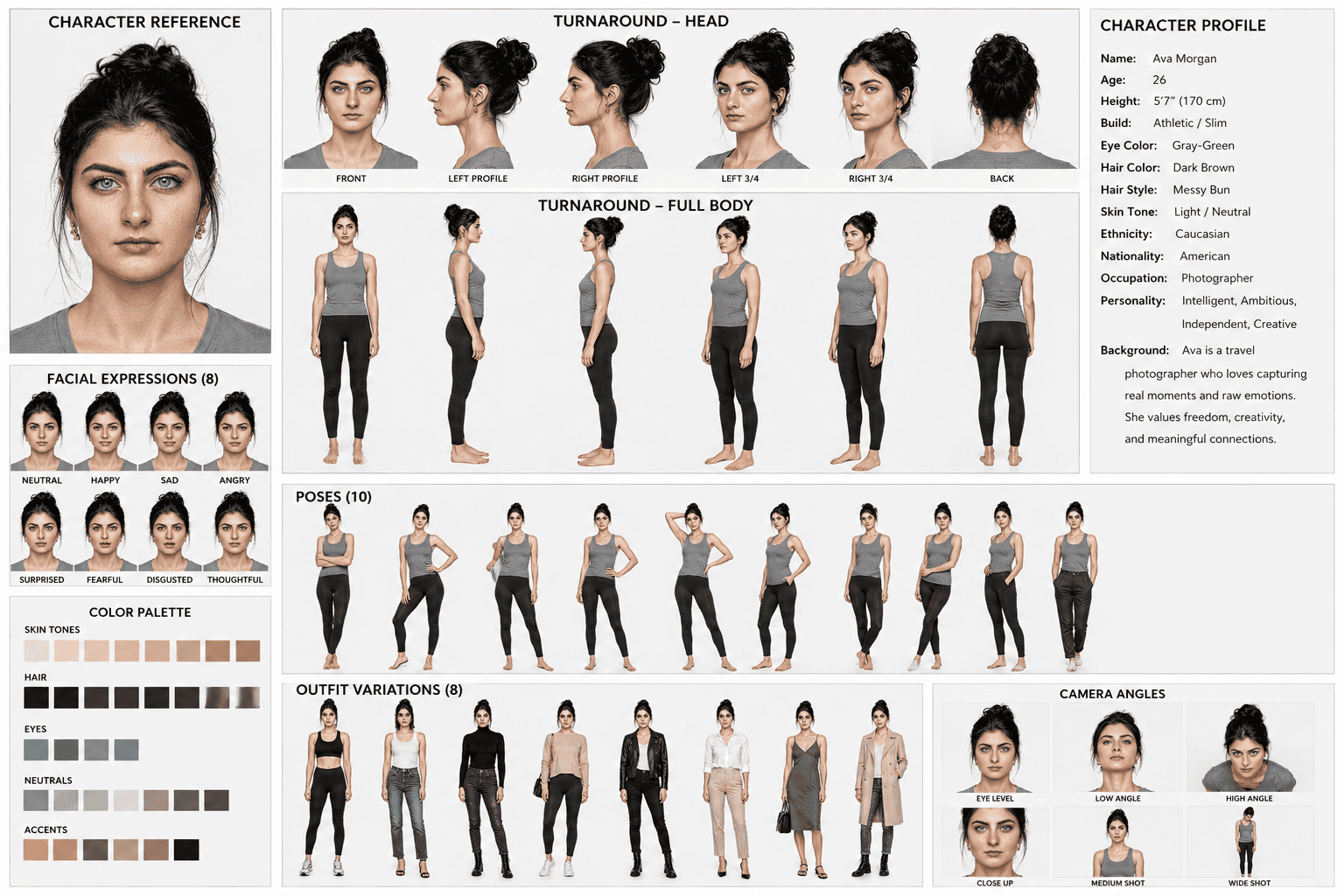
Professional Female Character Bible (Complete Example)
Theory is important, but the real value of a Character Bible comes from seeing how it works in practice.
In this section, we’ll build a complete professional Character Bible using a realistic female model as our reference. This workflow can be adapted for Midjourney, GPT Image, FLUX, Ideogram, Recraft, and most modern AI image and video generators that support reference images.
The objective is simple: create a reusable visual identity that remains recognizable across hundreds of images and videos.
Character Overview
This character is designed to represent a modern, confident, and cinematic professional. Rather than focusing on a specific profession, the identity is intentionally versatile so it can be placed into business, lifestyle, fashion, advertising, education, or storytelling scenes without redesigning the character.
Character Profile
Name: Elena Carter
Age: 26
Height: 170 cm (5’7″)
Body Type: Slim athletic build with natural proportions
Face Shape: Oval
Skin Tone: Light neutral complexion with realistic skin texture
Eye Color: Gray-green
Hair: Dark brown hair styled in a loose messy bun
Eyebrows: Thick, natural, well-defined
Expression: Calm, confident, approachable
Style: Modern cinematic realism
Personality: Intelligent, composed, creative, professional
Visual Identity Rules
These characteristics should remain consistent in every image and video.
Never change:
- Facial anatomy
- Eye color
- Hair color
- Hair style
- Skin tone
- Face proportions
- Eyebrow shape
- Body proportions
- Overall identity
These elements may change:
- Clothing
- Pose
- Camera angle
- Environment
- Lighting
- Accessories
- Facial expression
This simple separation helps reduce unnecessary character redesigns.
Character Bible Layout
A professional Character Bible for this model should include the following reference pages:
Page 1 — Master Reference
- Front view
- Left profile
- Right profile
- Back view
- Full-body reference
Page 2 — Facial Expressions
Include at least eight expressions:
- Neutral
- Happy
- Confident smile
- Surprised
- Thinking
- Serious
- Excited
- Concerned
The facial anatomy must remain identical in every expression.
Page 3 — Pose Library
Recommended poses:
- Standing naturally
- Walking
- Sitting
- Arms crossed
- Holding a laptop
- Looking at a phone
- Drinking coffee
- Presenting to camera
- Pointing
- Looking over shoulder
These poses become reusable assets for future projects.
Page 4 — Outfit Variations
Create multiple wardrobe options while preserving the same character.
Suggested outfits:
- Casual jeans and white shirt
- Black business suit
- Elegant evening dress
- Hoodie and sneakers
- Winter coat
- Fitness wear
- Smart casual office clothing
- Travel outfit
Changing clothes should never create a new identity.
Page 5 — Camera Angle References
Include:
- Close-up portrait
- Headshot
- Medium shot
- Full-body shot
- High-angle shot
- Low-angle cinematic shot
- Over-the-shoulder view
- Three-quarter portrait
These references help maintain consistency in AI videos.
Complete Image Prompt
Identity Lock Prompt
Use this together with your Character Bible whenever generating new images or videos.
Negative Prompt
Example Scene Prompt
Now imagine you want to place the same character inside a completely different environment.
Instead of rewriting the entire description, simply reuse the Character Bible and Identity Lock, then describe only the new scene.
Example:
Create the attached female character walking through a futuristic Tokyo street at night during rainfall. She is wearing a black trench coat, carrying a laptop bag, cinematic neon lighting, shallow depth of field, realistic reflections, natural walking motion, 35mm lens, maintaining identical facial anatomy and complete character identity.
Notice what changed:
- Environment
- Clothing
- Lighting
- Action
- Camera
Notice what did not change:
- Face
- Hair
- Eyes
- Body proportions
- Identity
This is exactly how professional creators build hundreds of consistent images from a single Character Bible.
The Prompt Home Pro Tip
One of the biggest mistakes beginners make is rewriting the character description for every new prompt.
Professionals rarely do this.
Instead, they create a Master Character Bible once, reuse the Identity Lock Prompt, and spend their time describing only the new scene, action, mood, and camera work.
This workflow is faster, cleaner, and produces far more consistent results.
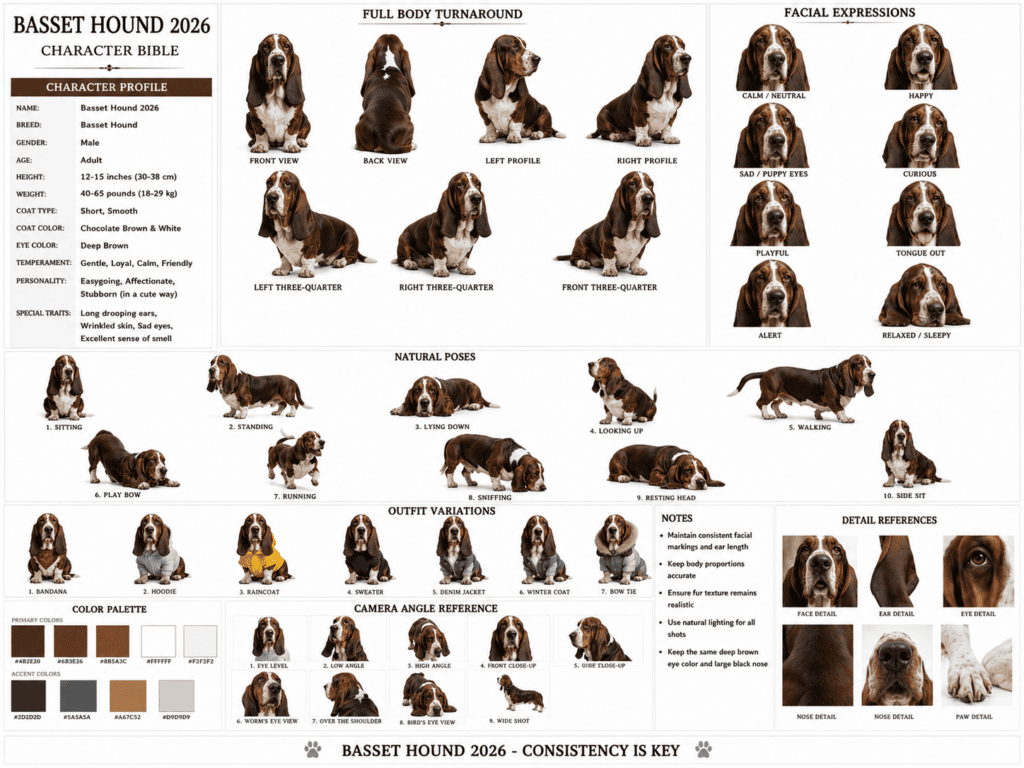
Professional Basset Hound Character Bible (Complete Example)
One of the biggest misconceptions about Character Bibles is that they’re only useful for human characters.
In reality, animal characters often require even more consistency.
Whether you’re creating a YouTube mascot, a children’s book, a social media influencer, or a cinematic AI film, your audience should instantly recognize the character—even when it appears in completely different scenes.
A Basset Hound is an excellent example because it has several unique physical traits that must remain consistent. If even one of these traits changes, the character may no longer look like the same dog.
Character Overview
This Character Bible is based on a realistic Basset Hound with a calm, intelligent, and friendly personality.
The goal is to preserve its identity across hundreds of AI-generated images and videos while allowing complete creative freedom with environments, clothing, poses, and storytelling.
Character Profile
Name: Winston
Breed: Basset Hound
Age: Adult
Body Type: Long body with short, muscular legs
Coat Pattern: Chocolate brown and white
Eye Color: Deep brown
Nose: Large black nose
Ears: Long, naturally drooping ears
Expression: Calm, curious, intelligent
Style: Ultra-realistic cinematic photography
Personality: Loyal, gentle, confident, relaxed
Visual Identity Rules
The following features should never change.
Identity Lock Features
- Long drooping ears
- Chocolate brown and white coat pattern
- White facial blaze
- Deep brown eyes
- Large black nose
- Long body
- Short legs
- Natural Basset Hound anatomy
- Relaxed facial expression
- Realistic fur texture
These are the visual characteristics that make Winston instantly recognizable.
Flexible Features
These elements may change freely:
- Clothing
- Accessories
- Environment
- Weather
- Pose
- Camera angle
- Lighting
- Facial emotion
- Story context
The dog can become a chef, businessman, police officer, explorer, or astronaut without losing its identity.
Character Bible Layout
A professional Basset Hound Character Bible should include the following pages.
Page 1 — Master Reference Sheet
Include:
- Front view
- Left profile
- Right profile
- Rear view
- Full-body standing pose
This becomes the foundation of the entire character system.
Page 2 — Facial Expression Library
Create eight expressions:
- Neutral
- Happy
- Curious
- Excited
- Sleepy
- Confused
- Proud
- Determined
Even with different emotions, the face should remain unmistakably Winston.
Page 3 — Pose Library
Suggested poses include:
- Sitting
- Standing
- Walking
- Running
- Lying down
- Paw raised
- Looking upward
- Holding an object
- Looking behind
- Waving one paw
These poses are ideal for storyboards and AI video generation.
Page 4 — Outfit Variations
The same character can appear in different roles without changing identity.
Suggested wardrobe:
- Business suit
- Chef uniform
- Detective coat
- Police uniform
- Winter jacket
- Casual hoodie
- Explorer outfit
- Luxury streetwear
Remember, the outfit changes—not the character.
Page 5 — Camera References
Include:
- Close-up portrait
- Head shot
- Medium shot
- Full-body shot
- Low-angle cinematic shot
- Eye-level portrait
- Over-the-shoulder shot
- Wide environmental shot
This allows the AI to understand the character from multiple perspectives.
Complete Character Bible Prompt
Identity Lock Prompt
Use this prompt alongside your Character Bible whenever generating new scenes.
Negative Prompt
Example Scene Prompt
Now let’s use the Character Bible to create a brand-new scene.
Example:
Generate the attached Basset Hound character walking confidently through a rainy New York street at night while wearing a tailored black business suit and gold chain. Cinematic lighting, wet pavement reflections, realistic walking motion, shallow depth of field, 50mm lens, ultra-realistic photography, maintaining identical facial markings, body proportions, and complete character identity.
Notice how only the story changes.
The character itself never changes.
This is the core principle behind professional AI storytelling.
The Prompt Home Pro Tip
Many creators create a new dog for every project without realizing it.
Professional creators don’t create new characters.
They create one memorable character and place it into hundreds of different stories.
That single workflow saves time, improves consistency, strengthens branding, and makes your audience instantly recognize the character wherever it appears.
The Prompt Home Signature Robot Character Bible
If your website regularly publishes AI prompts, tutorials, and creative workflows, having a recognizable mascot can strengthen your brand identity.
Think about some of the world’s biggest brands. Many of them have a character that people instantly recognize. The same concept works surprisingly well in AI content creation.
Instead of creating a different robot for every article, you can build one signature character that appears throughout your website, YouTube videos, Pinterest pins, and social media graphics.
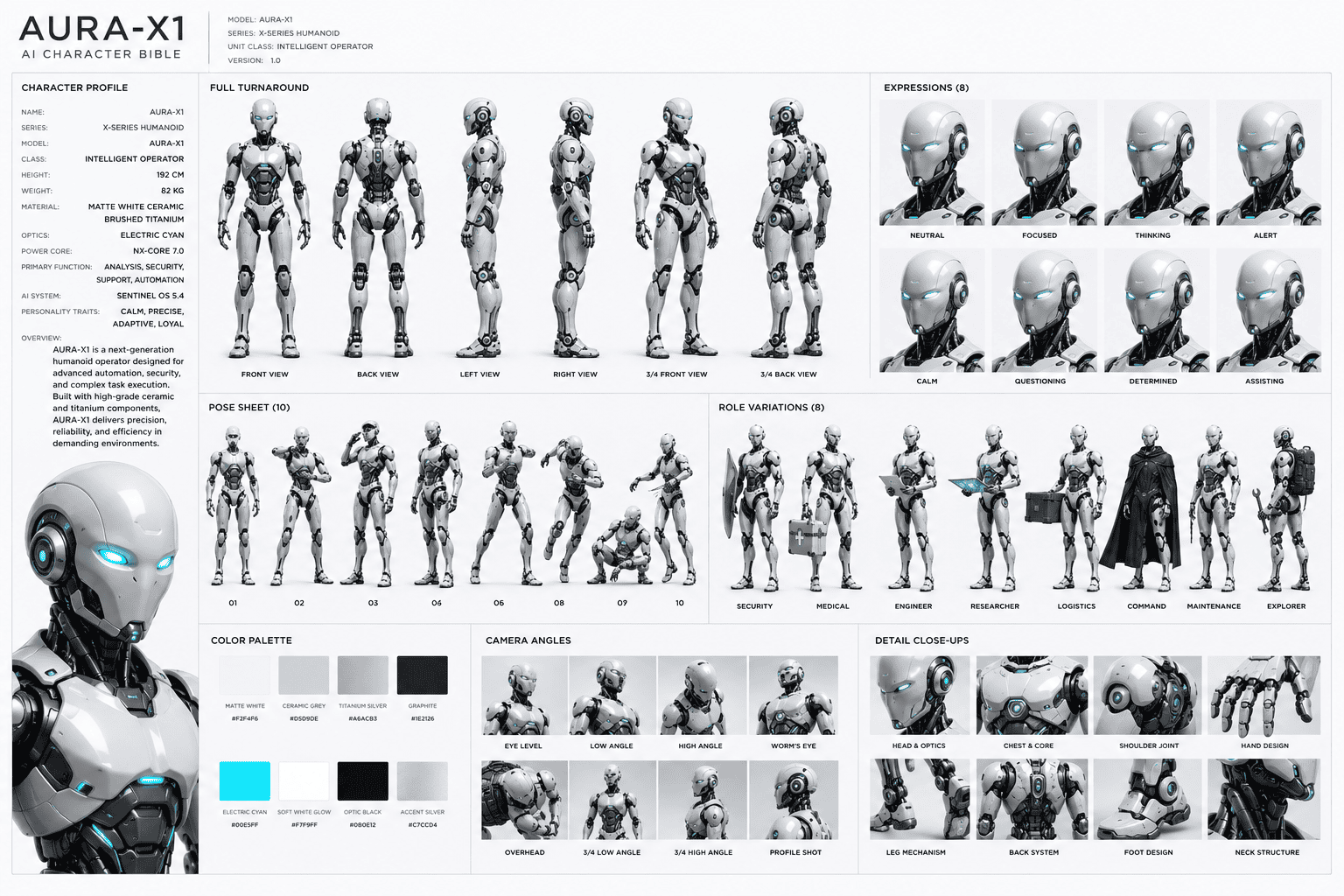
This section introduces AURA-X1, an original AI assistant designed exclusively for The Prompt Home.
Meet AURA-X1
AURA-X1 stands for Advanced Universal Robotic Assistant.
It represents intelligence, creativity, precision, and innovation—the same qualities readers expect when they visit a website dedicated to prompt engineering.
Rather than looking like a generic science-fiction robot, AURA-X1 is designed to feel premium, modern, and approachable.
Character Profile
Name: AURA-X1
Model: Advanced Universal Robotic Assistant
Height: 185 cm (6’1″)
Body Type: Slim, athletic humanoid frame with balanced proportions
Material: Matte white ceramic alloy with brushed titanium accents
Primary Accent Color: Electric cyan
Secondary Accent Color: Soft white illumination
Eye Design: Dual cyan optical lenses with subtle animated glow
Face Design: Minimalist expression panel with smooth contours
Voice Personality: Calm, intelligent, helpful, and professional
Purpose: AI educator, creative assistant, and digital guide
Visual Style: Cinematic futuristic realism
Visual Identity Rules
The following features define AURA-X1 and should remain identical in every generation.
Identity Lock Features
- Matte white ceramic shell
- Brushed titanium joints
- Electric cyan illuminated eyes
- Soft white light strips
- Smooth helmet-like head
- Slim humanoid proportions
- Five-finger robotic hands
- Clean futuristic silhouette
- Minimalist facial design
- Premium industrial finish
These elements form the robot’s permanent identity.
Flexible Features
The following elements can change depending on the story.
- Environment
- Pose
- Camera angle
- Accessories
- Background
- Lighting
- Weather
- Hand gestures
- Clothing overlays (optional)
- Holographic interface design
The robot should always remain recognizable regardless of the setting.
Character Bible Layout
Create a professional presentation sheet containing:
Page 1 — Master Reference
- Front view
- Back view
- Left profile
- Right profile
- Three-quarter views
- Full-body turnaround
Page 2 — Expression Library
Although the robot has a minimalist face, it can still communicate emotion through subtle changes.
Include:
- Neutral
- Friendly
- Curious
- Focused
- Analytical
- Happy
- Alert
- Confident
These expressions should be conveyed through eye animation and face-panel lighting rather than exaggerated human features.
Page 3 — Pose Library
Recommended poses:
- Standing naturally
- Greeting
- Pointing toward a display
- Holding a holographic interface
- Walking
- Presenting information
- Typing in mid-air
- Looking at floating data
- Arms crossed
- Hands behind back
Page 4 — Functional Modes
Show AURA-X1 in different professional roles:
- AI instructor
- Prompt engineer
- Research assistant
- Video producer
- Storyboard designer
- Data analyst
- Creative director
- Digital librarian
Each role should change only the props and environment, never the robot’s core identity.
Page 5 — Camera References
Include:
- Close-up portrait
- Medium shot
- Full-body shot
- Low-angle cinematic shot
- Over-the-shoulder view
- Wide establishing shot
- Dynamic action shot
- Studio portrait
Complete Character Bible Prompt
Identity Lock Prompt
Negative Prompt
Example Scene Prompt
Once your Character Bible is complete, you only need to describe the new scene.
Example:
Generate AURA-X1 presenting a futuristic holographic dashboard inside a premium AI research laboratory. Cinematic blue lighting, floating data interfaces, realistic reflections, ultra-detailed robotics, 35mm lens, photorealistic quality, maintaining identical robot proportions, materials, and complete character identity.
Notice that the robot remains exactly the same while only the environment and activity change.
This workflow allows you to build a recognizable brand mascot that can appear consistently across blog posts, tutorials, videos, Pinterest graphics, and promotional materials.
The Prompt Home Pro Tip
Don’t think of AURA-X1 as just another AI-generated robot.
Think of it as your brand ambassador.
When readers repeatedly see the same character across your content, they begin to associate that visual identity with your expertise. Over time, this consistency strengthens brand recognition, increases trust, and makes your content instantly recognizable—even before someone reads the title.
Advanced Workflow, Best Practices, FAQs & Final Thoughts
You’ve now learned what a Character Bible is, why Character Drift happens, and how to build complete Character Bibles for a human, an animal, and a robot. The final step is learning how professionals use these assets in real production workflows.
The difference between beginners and professionals isn’t just better prompts—it’s having a repeatable system.
Instead of starting from scratch every time, professional creators build reusable assets that can support hundreds of images and videos with the same recognizable identity.
The Professional Character Consistency Workflow
Think of your Character Bible as the foundation of every project.
A simple production workflow looks like this:
Step 1 — Build the Character Bible
Create the complete identity only once.
Include:
- Character Profile
- Multiple Views
- Expressions
- Poses
- Outfit Variations
- Color Palette
- Camera References
↓
Step 2 — Create an Identity Lock
Decide what can never change.
Examples:
- Face
- Eyes
- Hair
- Fur Pattern
- Body Proportions
- Materials
- Signature Accessories
↓
Step 3 — Write the Scene Prompt
Only describe:
- Environment
- Action
- Lighting
- Camera
- Mood
↓
Step 4 — Generate the Image
Review the result.
If the identity changes, strengthen the Identity Lock instead of rewriting the entire prompt.
↓
Step 5 — Reuse the Same Character Bible
Repeat the workflow for every future scene.
This method saves time and produces much stronger visual consistency.
Image-to-Video Workflow
One of the biggest advantages of a Character Bible is that it works for both images and videos.
A recommended workflow is:
Character Bible → Reference Image → Identity Lock → Image Generation → Video Generation
Instead of asking an AI video model to invent a character from text, you’re giving it a stable visual identity first.
This greatly increases the chances of producing believable, consistent videos.
Common Mistakes to Avoid
Even experienced users make these mistakes. Avoiding them can dramatically improve your results.
1. Using Only One Reference Image
One image rarely contains enough information.
Always provide multiple views whenever possible.
2. Changing the Character Description Every Time
Constantly rewriting the character description often introduces new variations.
Keep the character description fixed.
Only change the scene.
3. Forgetting the Identity Lock
A Character Bible provides visual guidance.
The Identity Lock tells the AI exactly what must remain unchanged.
Using both together produces better consistency.
4. Changing Multiple Variables at Once
If you change the clothing, lighting, camera angle, hairstyle, and environment in a single prompt, it becomes harder to identify what caused the inconsistency.
Test one major change at a time when building a new workflow.
5. Ignoring Body Proportions
Many creators focus only on the face.
Professional Character Bibles also define body proportions, posture, and silhouette.
6. Rebuilding Characters Instead of Reusing Them
The strongest AI brands don’t create hundreds of different characters.
They create one memorable character and reuse it consistently.
Recognition grows through repetition.
Best Practices
If your goal is professional-quality AI content, follow these guidelines:
- Build the Character Bible before writing scene prompts.
- Keep a separate Identity Lock for every character.
- Store your Character Bible in a dedicated folder for future projects.
- Use consistent naming conventions for files and prompts.
- Test new prompts using the same reference sheet before expanding to larger projects.
- Update the Character Bible only when you intentionally redesign the character.
Treat your Character Bible like a creative asset, not a one-time prompt.
Frequently Asked Questions (FAQ)
1. What is an AI Character Bible?
An AI Character Bible is a structured collection of visual references and written guidelines that define a character’s appearance, identity, poses, expressions, outfits, and proportions to improve consistency across AI-generated images and videos.
2. Can a Character Bible guarantee identical results every time?
No.
It significantly improves consistency, but no current AI model can guarantee 100% identical results in every generation.
3. Is one reference image enough?
Usually not.
A complete Character Bible provides far more information than a single image and reduces the amount of guessing the AI has to do.
4. Does this workflow work for animals?
Yes.
Animal characters often benefit even more from Character Bibles because fur patterns, facial markings, and body proportions need to remain consistent.
5. Can I use the same Character Bible for AI videos?
Yes.
Many modern AI video generators can benefit from structured reference images and clear Identity Lock instructions.
6. Should I create a new Character Bible for every project?
No.
Create one strong Character Bible for each character and reuse it across multiple projects.
7. What is an Identity Lock?
An Identity Lock is a short instruction that tells the AI which visual elements must never change while allowing other elements, such as clothing or environments, to vary.
8. What’s the biggest cause of Character Drift?
Insufficient reference information.
When the AI has to guess missing details, the likelihood of inconsistency increases.
9. Which characters benefit the most from a Character Bible?
Human characters, animals, robots, mascots, comic characters, game characters, and brand ambassadors all benefit from a well-designed Character Bible.
10. Is a Character Bible useful for beginners?
Absolutely.
Starting with a structured workflow makes it easier to learn prompt engineering and achieve more consistent results from the beginning.
Final Thoughts
AI image and video generation are evolving rapidly, but one challenge remains the same: consistency.
Creating a great image is easy. Creating the same character across dozens—or even hundreds—of images and videos is where a structured workflow becomes essential.
A Character Bible gives your AI projects a reliable visual foundation. Combined with an Identity Lock and well-written scene prompts, it transforms isolated generations into a cohesive creative system.
Whether you’re building a YouTube series, an AI brand mascot, a comic, a children’s book, or a cinematic short film, investing time in a strong Character Bible will save countless hours later and produce results that feel far more polished and professional.
Rather than asking AI to reinvent your character every time, teach it who the character is first. Once that identity is established, every new scene becomes faster, more consistent, and far more enjoyable to create.
Create Your Own AI Art Now!
Use our powerful, custom-built AI Prompt Generation tool to turn your words into masterpieces instantly.
Try Our Free AI Tool 🚀Create Your Own AI Portfolio Now!
Use our powerful, custom-built AI Portfolio Generation tool to turn your words into masterpieces instantly.
Try Our Free AI Portfolio 🚀