3D Cartoon Animation Prompts: Complete AI Image & Video Guide
Last Updated: August 2026
When you scroll through digital art feeds, social media clips, or video platforms, vibrant 3D animated characters instantly catch your eye. In AI image and video generators, these designs belong to the 3D Cartoon & Animation Category.
With modern AI tools, 3D cartoon styles fit a wide range of practical projects—from character concepts and short animated loops to children’s storybooks, social graphics, and brand mascots. This guide gives you a practical foundation for building clean visual assets without needing years of complex software training.
Below, you will learn how 3D cartoon styles work, where creators use them, how prompting for static images differs from video motion, and how to write clear prompts step by step.
What is the 3D Cartoon & Animation Category?
The 3D cartoon category includes prompt structures and visual elements designed to create three-dimensional graphics and moving clips.
Unlike flat 2D sketches, 3D cartoons feature physical volume, light reflection, surface depth, and tangible textures. Across modern AI image and video tools such as Midjourney, Leonardo AI, Runway, Kling AI, and Pika, this style generally falls into two main formats,
3D Static Images: Character designs, concept art, mini dioramas, and storybook graphics. If you want ready-to-use ideas for still visuals, browse our 3D Cartoon AI Image Prompts gallery.
3D Video Animations: Short clip loops, character movement sequences, and simple camera pans. For motion ideas, check out our AI Cartoon Video Prompts collection.
Organizing these assets into a clean category helps you pick a consistent style quickly without guessing technical terms.
Creative Ways to Use 3D Cartoon Prompts
Using 3D cartoon prompts allows creators, storytellers, and small business owners to publish content across platforms efficiently.
Here are a few common ways creators use this visual style:
1. Animated Shorts and Web Clips
Using AI video tools, you can outline a simple idea, generate character visuals, animate individual scenes, and combine them into a short video. Many independent channels use this workflow for storytelling.
2. Short-Form Video (YouTube Shorts, Reels, TikTok)
Short clips with expressive 3D characters can work well for entertainment, storytelling, and social media content.
3. Children’s Storybooks
Self-publishing picture books is a practical use case for 3D visuals. Family-friendly 3D styles work well for illustrating bedtime stories, learning materials, and character adventures.
4. Brand Mascots and Graphic Assets
Small businesses and online shops often use 3D character mascots to make their brand memorable. A custom character adds a friendly human touch to websites, logos, packaging, and promo posts.
Popular 3D Styles in This Category
The 3D cartoon category includes a few distinct sub-styles. Knowing what each look offers helps you pick the right prompt keywords for your project.
1. Family-Friendly Cinematic 3D
This aesthetic often features expressive eyes, polished character design, detailed textures, and soft cinematic lighting.
Best Used For: Character designs, storybook pages, and short animated scenes.
Key Prompt Terms: Pixar-inspired 3D, Disney-inspired animation look, soft ambient lighting, expressive face, detailed character design.
2. Puffy, Fluffy & Furry 3D
This look focuses on soft textures like fur, felt, plush fabric, or puffy cloth, making characters look like tangible physical toys.
Best Used For: Cute animal characters, social media avatars, stickers, and simple graphics.
Key Prompt Terms: Puffy 3D character, fluffy fur groom, soft plushie texture, felt material, tactile design.
3. Claymation & Stop-Motion 3D
This style mimics handcrafted clay models. It includes subtle seams, soft matte finishes, and slight surface details that look like stop-motion animation.
Best Used For: Creative story clips, music visuals, short comedy bits, and artistic posts.
Key Prompt Terms: Claymation style, plasticine texture, subtle clay seams, stop-motion aesthetic, soft matte finish.
4. Vinyl Art Toy 3D
Inspired by collectible vinyl figures, this look relies on smooth plastic surfaces, simple shapes, clean lines, and subtle reflections.
Best Used For: Brand mascots, digital avatars, simple product ideas, and merchandise graphics.
Key Prompt Terms: Vinyl art toy aesthetic, smooth plastic finish, minimalist design, studio backdrop, clean vector geometry.
5. Isometric 3D Dioramas
Isometric 3D displays miniature rooms, landscapes, or scenes from a fixed angled view, offering a clean layout.
Best Used For: Game environment concepts, simple architectural ideas, diagrams, and maps.
Key Prompt Terms: 3D isometric view, miniature room diorama, tilt-shift focus, clean architectural lighting.
Prompting for Still Images vs. Video Clips
Prompting for a still picture works a bit differently than prompting for a moving video clip.
| Prompt Type | Main Focus | Typical Elements Included | Useful Tools |
| 3D Still Image Prompts | Visual detail, style, and framing | Subject, surface textures, lighting style, camera angle | Midjourney, Leonardo AI, ChatGPT |
| 3D Video Motion Prompts | Movement, action, and pacing | Subject movement, camera direction, action timing | Runway, Kling AI, Pika Labs |
For Image Prompts: Describe the subject, surface materials, lighting environment, and camera placement clearly.
For Video Prompts: Focus on action. Describe what moves, how fast it moves, and how the camera tracks the scene over a few seconds.
How to Customize Prompts From Our Cards
When you pick a prompt template from The Prompt Home, you can easily edit it using this simple formula:
The 3D Prompt Formula
Subject + 3D Style + Texture/Material + Lighting & Environment + Camera/Quality
Practical Example
Suppose a card prompt reads: “A 3D cartoon dog sitting in a park.” Here is how you can tweak it:
Change the Subject: Swap “dog” for “young astronaut”.
Pick a Style: Choose “Pixar-inspired 3D style”.
Add Material & Texture: Add “smooth white spacesuit with fabric patches”.
Set Environment & Lighting: Add “standing on the moon, starry background, soft blue ambient light”.
Set Camera & Quality: Add “wide-angle shot, clear detailed render”.
Your Customized Prompt:
“A Pixar-inspired 3D astronaut in a smooth white spacesuit with fabric patches, standing on the moon, starry sky background, soft blue ambient light, wide-angle shot, clear detailed render.”
Simple Workflow: Creating a Short 3D Animated Video
If you are new to AI animation, here is a practical workflow for turning an idea into a short video clip:
Keep the Idea Short: Outline a simple 10-second moment. Example: “A cute 3D dragon tries to light a birthday candle with a tiny puff of fire.”
Generate the Still Visual: Pick a style and create your character image using Midjourney or Leonardo AI.
Animate the Scene: Runway, Kling AI, and Pika can be useful for turning 3D character concepts into short motion sequences. Upload your image and add motion cues like “dragon blows a small flame, candle lights up, dragon smiles, gentle camera zoom.”
Edit Audio: Add a voiceover, sound effect, or subtle background track in an editor like CapCut.
Publish: Upload your finished 3D clip to YouTube Shorts, TikTok, or Instagram Reels.
3D Cartoon Prompts You Can Try
1. Fluffy Character Image Prompt (Midjourney / Leonardo AI)
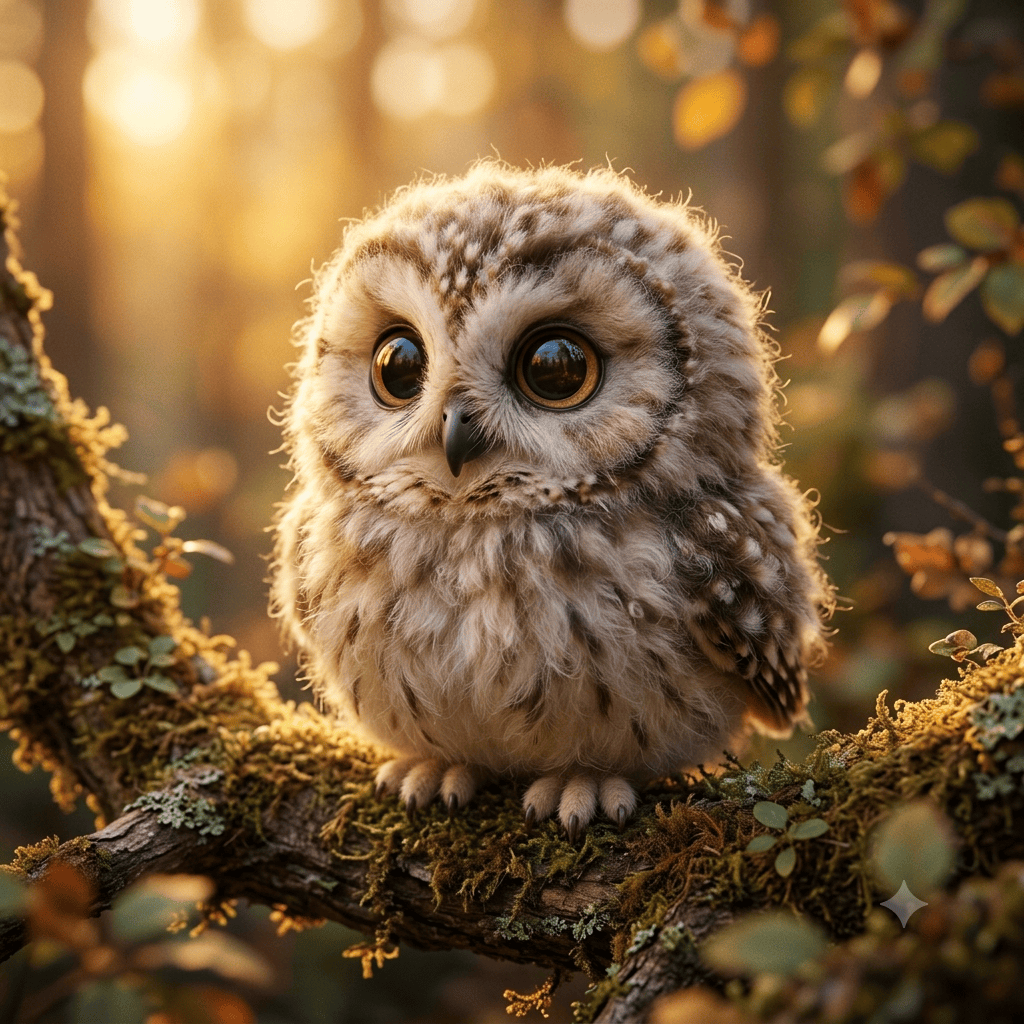
2. Cinematic 3D Video Motion Prompt (Runway / Kling / Pika)
3D Style Quick Reference
Use this reference table to match your project idea with a suitable 3D style:
| Style Variant | Primary Visual Feature | Common Project Use | Example Tools |
| Pixar-Inspired | Soft skin, expressive eyes, clear hair strands | Short films, storybooks, social content | Midjourney, Runway, Kling AI |
| Puffy & Fluffy | Soft fur, felt fabric, plush textures | Social media graphics, avatars, stickers | Midjourney, DALL-E 3 |
| Claymation | Matte clay, subtle seams, stop-motion feel | Story clips, indie skits, art concepts | Midjourney, FLUX, Pika Labs |
| Vinyl Toy | Glossy plastic, simple geometry | Brand mascots, merchandise, avatars | Midjourney, Leonardo AI |
| Isometric 3D | Angled view, miniature scenes | Game environment concepts, simple diagrams | Midjourney, Stable Diffusion |
Frequently Asked Questions (FAQs)
What is the 3D cartoon category used for?
This category offers structured prompt styles for creating static 3D character art, storybook illustrations, social media graphics, and short video animations.
Do I need traditional 3D modeling skills to use these prompts?
No. These prompts help creators design 3D-style visuals without first learning complex modeling software like Blender or Maya.
How do I keep a character looking consistent across different prompts?
To maintain character consistency, keep key descriptors (clothing color, hair style, facial features, and style terms) identical across all prompts. Using character reference tools in Midjourney or Leonardo AI also helps lock in visual features.
Which AI tools can be used for 3D video motion prompts?
Tools such as Runway, Kling AI, and Pika can be used to turn 3D character concepts into short motion sequences. Results can vary depending on the model, reference image, and prompt.
Final Thoughts
The 3D Cartoon & Animation Category gives you a flexible visual starting point for digital content creation. By understanding different sub-styles—like Pixar-inspired characters, fluffy textures, or claymation—you can quickly guide AI tools to produce clean graphics and video loops.
To start building, explore our 3D Cartoon AI Image Prompts or test motion prompts with our AI Cartoon Video Prompts. Customize these templates to suit your story and bring your next project to life.
About The Author
Saleem Noor is a digital creator and the founder of The Prompt Home. He creates and tests practical AI image and video prompt workflows to help creators develop visual content for social media, digital projects, and creative campaigns.