Turn Old Family Photos into a Viral 3D Family Portrait (AI Prompt Guide)
Imagine taking those old, scattered individual photos of your family members—the ones sitting in your phone gallery or old photo albums—and turning them into a unified, magical 3D artwork. You don’t need a professional family photoshoot to create something breathtaking. With the power of AI, you can now blend separate individual pictures of your kids, your spouse, and yourself into a single, cohesive animated masterpiece that looks like an official upcoming movie poster from Disney or Pixar.
This specific style went completely viral across Facebook and Instagram for a simple reason: it tells a story. Instead of a boring, flat group photo where everyone just stands in a line, this layout uses a playful Vertical Stacked Ladder Composition. The family members are arranged by age, playfully peeking out one by one from behind a clean, solid wall. It captures the unique personality of each person, bringing a warm, emotional smile to anyone who sees it. Best of all, this beginner-friendly guide will show you how to do it in less than two minutes.
The Golden Rule: Building the Visual Ladder (From Smallest to Tallest)
The secret sauce behind this viral image lies in how the characters are arranged behind the wall. To make the visual flow look satisfying and natural, the composition follows a strict bottom-to-top age progression.
The Base (The Youngest): The smallest toddler or baby sits at the very bottom of the frame, peeking out with wide, innocent eyes.
The Middle (The Older Siblings): As your eyes move upward, the older children emerge, each showing a bit more height and a unique playful expression.
The Anchors (The Parents): Near the top, the mother stands elegantly, and at the very peak of the stack, the father anchors the entire family with a warm, protective smile.
This beautiful sequence creates a perfect visual balance, making it incredibly easy for the AI to map the faces without cluttering the screen.
The 3-Step Beginner Guide (No Technical Confusion!)
If you have never used an AI art generator before, don’t worry. You do not need to know any complex coding. All you need are individual, clear photos of your family members. Follow these three simple steps:
Gather and Upload: Take a clear individual photo of each family member. Open your favorite AI tool (like Midjourney or Leonardo AI) and upload those pictures into the chat or generator.
Copy the Image Links: Once uploaded, right-click or tap on each image to copy its direct web link (URL).
Paste into the Template: Copy one of the custom-made templates below, paste all your individual photo links right at the very beginning, and hit generate!
The Viral Custom Prompt Templates (Beginner-Friendly)
Here are the two premium, copy-paste text prompt strings designed to match the exact visual layout of your reference assets.
The Classic Family of 4 Stack
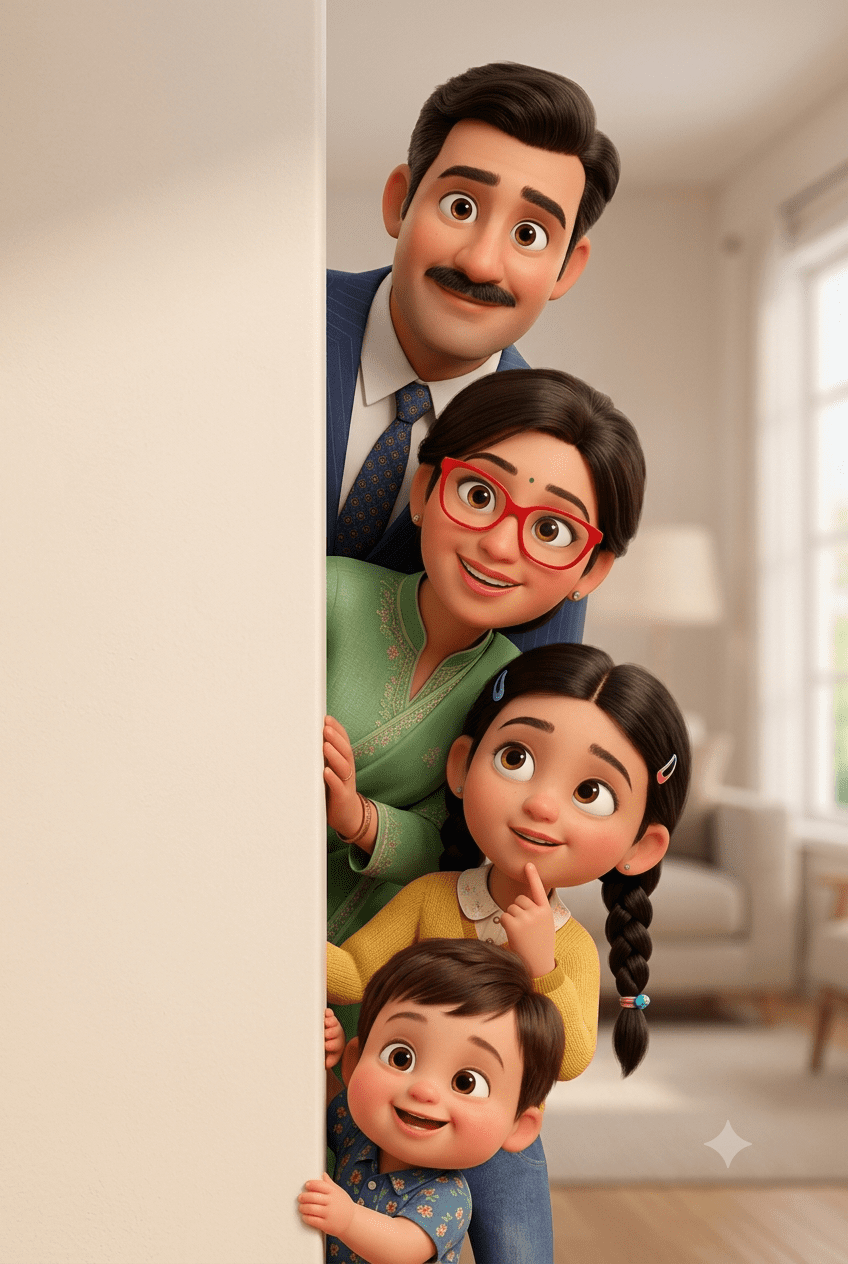
Copy the Family of 4 Prompt
The Big Family Clan (Family of 6 to 10 Stack)
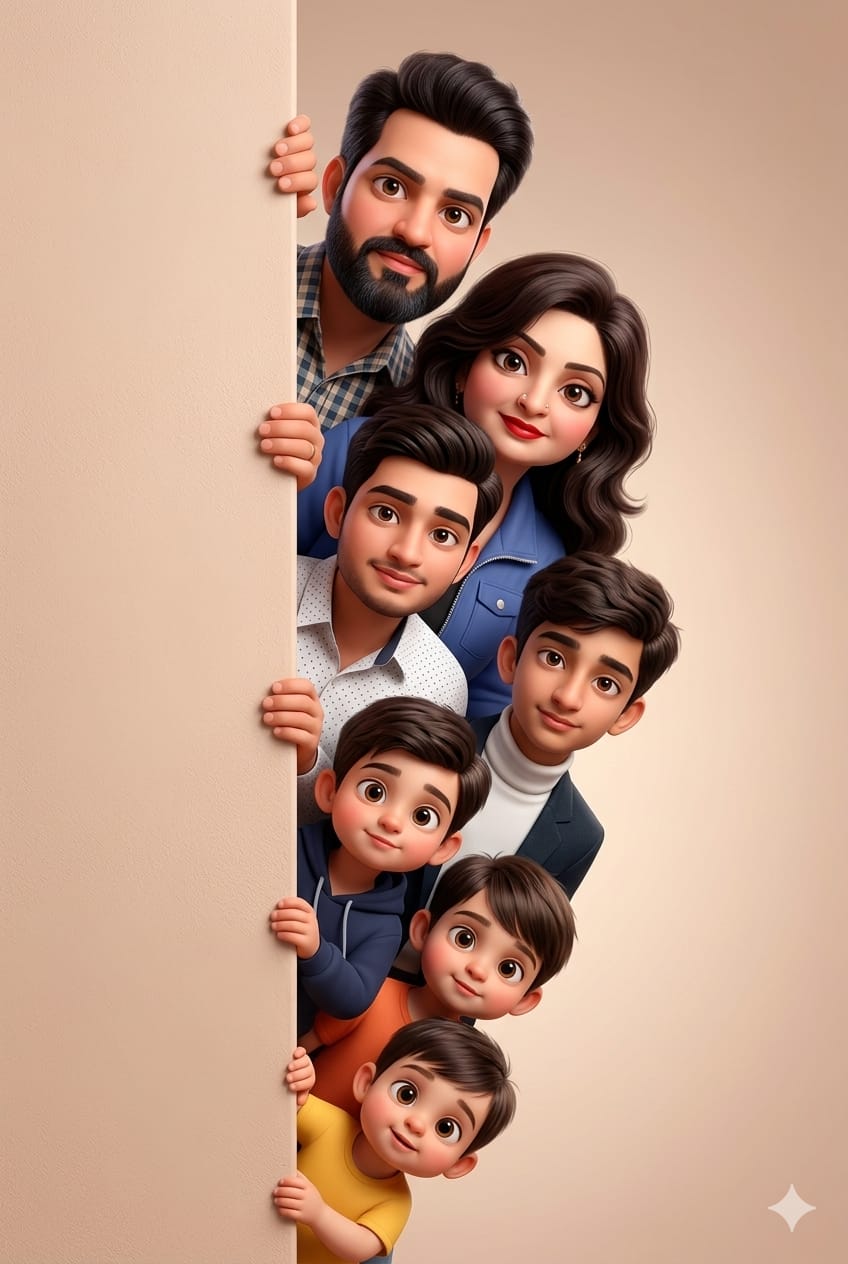
Copy the Family of 7 Prompt
The Ultimate Video Secret: How to Create a Viral Pop-Out Animation
The reason this specific vertical wall-peeking structure is a goldmine for content creators is because it translates perfectly into short-form videos for TikTok, Instagram Reels, and YouTube Shorts.
If you take your generated 3D portrait asset and feed it into an AI video engine like Luma Dream Machine or Runway Gen-2, you can create a viral “Pop-Out Effect.” Use this simple video prompt instruction:
“Keep the background and the beige wall completely static. Animate the characters to pop out from behind the wall one by one, starting from the smallest baby at the bottom up to the father at the top, blinking naturally and laughing joyfully.”
When you edit this video, match each family member’s appearance to a fun, upbeat beat-drop in a trending cinematic audio track. Show the individual old real-life photos first, and then let the characters pop out one by one into their gorgeous 3D avatars. This simple editing loop hooks the viewer instantly, generating massive watch-time and sending your traffic metrics through the roof!
Conclusion
Creating a premium family legacy piece shouldn’t be complicated. By using your old, separate family photos as reference points and stacking your characters from the smallest child up to the parents, you can create a deeply personal, viral-ready piece of digital art. Grab your family photos, copy these tailored prompt strings, and start rendering your own animated movie poster completely for free today!
Create Your Own AI Art Now!
Use our powerful, custom-built AI Prompt Generation tool to turn your words into masterpieces instantly.
Try Our AI Tool 🚀Create Your Own AI Portfolio Now!
Use our powerful, custom-built AI Portfolio Generation tool to turn your words into masterpieces instantly.
Try Our AI AI Portfolio 🚀
Hi
hi
hi